
Can You Revoke Access to a Shared File? (Complete Guide to File Control & Secure Sharing)
Introduction
One of the most common questions in modern digital document sharing is simple but critical:
Can you revoke access to a shared file after it has already been sent?
The answer depends entirely on the type of file sharing method you are using.
In traditional systems like email attachments or basic cloud storage links, the short answer is often no — or only partially.
However, with modern secure file sharing platforms, the answer becomes:
Yes — you can revoke access to a shared file instantly, even after it has been opened or distributed.
This capability is known as file access revocation or file recall, and it is one of the most important advances in secure document control.
In this guide, we’ll explain how file access revocation works, why it matters, what the limitations are in traditional systems, and how modern platforms like FileRecall allow you to maintain full control over shared documents at all times.
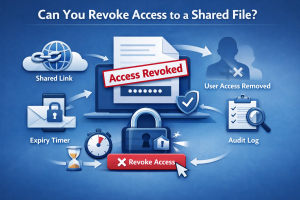
What Does It Mean to Revoke Access to a Shared File?
Revoking access means removing a recipient’s ability to view, download, or interact with a file that has already been shared.
Once access is revoked:
- The link becomes inactive
- The file can no longer be opened
- Previous permissions are disabled
- Further distribution is prevented
In advanced systems, access can be revoked:
- Immediately after sending
- After the file has been opened
- After a specific time period
- Based on security rules or expiry settings
This gives the sender ongoing control over the document even after delivery.
Why File Access Revocation Matters
In business and professional environments, documents are often shared that contain sensitive or confidential information.
These may include:
- Contracts and agreements
- Financial statements
- Investor presentations
- Legal documents
- Client records
- Intellectual property
- Strategic business plans
Once these files are sent, circumstances can change quickly.
For example:
- The wrong recipient may have been selected
- A deal may change or fall through
- Information may become outdated
- A security risk may be identified
- Internal approval may be withdrawn
Without access revocation, these documents remain accessible indefinitely.
This creates unnecessary risk.
Can You Revoke Access in Traditional File Sharing?
Email Attachments
With standard email attachments:
- You cannot revoke access
- Once downloaded, the file is permanently in the recipient’s control
- Forwarding cannot be prevented
- No visibility exists after sending
Email is effectively a “fire-and-forget” system.
Google Drive / Dropbox Links
Cloud storage tools offer slightly more control:
- You can remove sharing permissions
- You can disable links
- You can restrict future access
However, limitations include:
- Files may already have been downloaded
- Access control is often reactive, not proactive
- Tracking capabilities are limited in basic setups
- No true “recall” system exists for distributed files
Modern Secure File Sharing: A Different Approach
Modern platforms like FileRecall are designed specifically to solve these limitations.
Instead of simply storing files or sharing folders, they focus on controlled document delivery with post-send management.
This means you can:
- Revoke access instantly
- Disable shared links at any time
- Control file visibility after sending
- Track file engagement
- Set automated expiry rules
This transforms file sharing from a static action into a dynamic, controllable system.
👉 Start Free Trial (No Credit Card Required)
How File Access Revocation Works
Secure file sharing platforms typically use a link-based access system.
Here’s how it works step by step:
1. File Upload
You upload a document to a secure platform.
The file is stored in an encrypted environment rather than being directly sent.
2. Secure Link Generation
A unique access link is created for the recipient.
This link is:
- Controlled by permissions
- Linked to your account
- Fully manageable after sending
3. Access Permissions Applied
Before sharing, you can set controls such as:
- Password protection
- Expiry dates
- Download restrictions
- View-only permissions
4. File is Shared
The recipient accesses the file through the secure link.
5. Access Can Be Revoked at Any Time
At any point after sharing, you can:
- Disable the link
- Remove user access
- Revoke viewing permissions
- Immediately block further access
Once revoked, the file becomes inaccessible.
What Happens When Access Is Revoked?
When access to a shared file is revoked:
- The link stops working instantly
- The file can no longer be viewed
- Any active sessions are terminated
- Download access is blocked
- The recipient is prevented from re-opening the file
In secure systems, revocation is immediate and irreversible from the recipient’s perspective.
File Recall vs Simple Access Removal
It’s important to distinguish between basic access removal and full file recall.
Basic Access Removal
- Stops future access
- May not affect previously downloaded files
- Limited visibility
File Recall (Advanced Systems)
- Instantly disables all access
- Revokes active sessions
- Centralised control over document lifecycle
- Often combined with tracking and expiry features
👉 Learn more: How to Recall a Sent File
👉 Start Free Trial (No Credit Card Required)
When Should You Revoke Access to a File?
There are many real-world scenarios where file revocation is essential:
1. Sent to the Wrong Person
Mistakes happen. Revocation allows immediate correction.
2. Confidential Information Risk
If a document is no longer safe to share, access can be removed instantly.
3. Deal or Negotiation Changes
Investor terms, contracts, or agreements may change.
4. Project Completion
Once a project is complete, access can be withdrawn.
5. Employee or Contractor Changes
Offboarding requires immediate document access removal.
Benefits of Being Able to Revoke File Access
Improved Security
Sensitive data can be protected even after sending.
Reduced Risk
Limits exposure from accidental sharing or leaks.
Better Control
You remain in control of documents at all times.
Compliance Support
Helps meet internal and regulatory requirements.
Flexibility
Permissions can be adjusted dynamically as situations change.
Limitations of Traditional Systems
Without file recall or revocation features, users face:
- Permanent document exposure
- No control after sending
- Risk of uncontrolled forwarding
- Lack of visibility into usage
- No ability to correct mistakes
This is why modern secure file sharing platforms are increasingly being adopted.
FileRecall: Full Control After Sending
FileRecall is designed to solve the core problem of traditional file sharing:
Once a file is sent, control is often lost.
With File Recall, users can:
- Revoke access instantly
- Recall shared documents
- Track file activity
- Control downloads
- Set expiry dates
- Protect files with passwords
- Add watermarking
This ensures full lifecycle control of sensitive documents.
Can the Recipient Still Access a Revoked File?
No.
Once access is revoked:
- The file link becomes inactive
- Viewing is blocked
- Access is terminated
Even if the recipient saved the link, it will no longer function.
Best Practices for File Access Control
To maximise security:
1. Use Secure File Sharing Tools
Avoid relying solely on email attachments.
2. Revoke Access When No Longer Needed
Do not leave files accessible indefinitely.
3. Combine With Expiry Settings
Set automatic expiration where possible.
4. Track File Activity
Monitor who accessed documents and when.
5. Use Password Protection for Sensitive Files
Add an extra layer of security.
👉 Start Free Trial (No Credit Card Required)
Conclusion
So, can you revoke access to a shared file?
- With traditional email attachments: No
- With basic cloud storage: Partially
- With modern secure file sharing platforms: Yes — fully and instantly
File access revocation is now a critical feature for anyone sharing sensitive or time-sensitive documents.
It ensures that even after a file has been sent, you remain in control of who can access it, when they can access it, and whether they can access it at all.
For businesses and professionals handling confidential information, this capability is no longer optional — it is essential.
👉 Learn more about the broader concept: How to Recall a Sent File