
Email Attachments vs Controlled Document Access
The Complete Guide to Secure Document Sharing for Modern Businesses
Email attachments have been the default way to share documents for decades. But modern security, compliance, and governance requirements have exposed a fundamental weakness in this approach: once a file is sent, control is lost.
Controlled document access replaces email attachments with secure, browser-based document governance—where access is managed, tracked, and revocable at any time.
This page compares both approaches in detail so you can understand which model is safer for sensitive business communication.
 Start Free Trial (No Credit Card Required)
Start replacing insecure email attachments with controlled document access today.
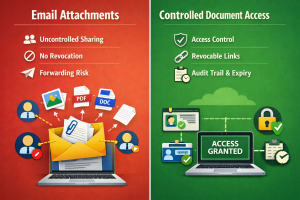
The Core Difference (Sending Files vs Controlling Access)
The difference between email attachments and controlled document access comes down to one fundamental concept:
Email Attachments
➡️ You send a copy of the file to someone
Controlled Document Access
➡️ You control how the document is accessed without sending the file itself
Email is built on file distribution.
Controlled document access is built on access governance.
That single difference changes everything about security, compliance, and visibility.
Why Email Attachments Were Never Designed for Security
Email was designed for communication—not secure document distribution.
When you attach a file:
- A full copy is sent to the recipient
- You lose visibility immediately after delivery
- The file can be forwarded infinitely
- It can be downloaded and stored permanently
Even if the email is deleted or recalled, any downloaded file remains outside your control.
This creates a permanent blind spot in document security.
Side-by-Side Comparison
Feature | Email Attachments | Controlled Document Access |
Sends original file | ✔ | ✖ |
Requires download | ✔ | ✖ |
Prevents forwarding | ✖ | ✔ |
Real-time tracking | ✖ | ✔ |
Instant access revocation | ✖ | ✔ |
Expiry control | ✖ | ✔ |
Watermarking per user | ✖ | ✔ |
Audit trail of activity | ✖ | ✔ |
File remains on server | ✖ | ✔ |
Controlled viewing session | ✖ | ✔ |
 Start Free Trial (No Credit Card Required)
The Real Risk of Email Attachments
The biggest issue with email attachments is not intentional misuse—it is everyday behaviour.
Common risks include:
- Sending documents to the wrong recipient
- Forwarding internally without oversight
- Storing sensitive files on personal devices
- Using outdated versions of documents
- Losing track of who has access to what
These risks scale rapidly in larger organisations where hundreds of documents are shared daily.
Over time, this leads to uncontrolled duplication of sensitive information across systems.
The “Lost Control” Problem
Once an email attachment is sent:
- You cannot see who forwards it
- You cannot stop copies being made
- You cannot revoke downloaded files
- You cannot track real usage
Even if you delete the original email, you cannot remove copies already saved externally.
This is the core limitation of email-based document sharing.
Controlled document access removes this problem entirely by ensuring:
- No file is distributed
- Access is session-based
- Viewing can be revoked instantly
- Everything is tracked centrally
How Controlled Document Access Works Instead
Instead of attaching a file, controlled document access systems:
- Store the document securely on a central server
- Generate a secure access link
- Allow viewing inside a browser-based environment
- Stream content without exposing a downloadable file
- Track all activity in real time
This means:
- The document never leaves your control
- The recipient never receives a permanent file copy
- Every interaction is visible and auditable
👉 Related reading: View-Only Document Sharing
👉 Related reading: Secure Document Sharing
Tracking & Visibility Differences
Email Attachments
- No visibility after sending
- No engagement tracking
- No view confirmation
- No behavioural insights
Controlled Document Access
- See when a document is opened
- Track how long it is viewed
- Identify repeat engagement
- Build a full audit trail
This transforms document sharing into a measurable workflow.
It is no longer guesswork.
Security Breakdown (What Actually Happens After Sending)
With Email:
- File is attached
- Recipient receives a copy
- File is downloaded or forwarded
- Sender loses control permanently
With Controlled Document Access:
- File is uploaded securely
- Access link is generated
- Recipient views document in browser
- System tracks all activity
- Access can be revoked anytime
The key difference is simple:
Email sends a file. Controlled access manages a session.
Compliance Risks with Email Attachments
Modern compliance frameworks require organisations to demonstrate control over sensitive data.
Email fails this requirement because:
- There is no audit trail of document usage
- Files exist outside controlled systems
- Access cannot be revoked reliably
- Distribution cannot be monitored
Controlled document access solves this by providing:
- Full access logs
- Revocation capability
- Time-based expiry
- Centralised governance
This is especially important in:
- Legal
- Financial services
- HR
- Healthcare
- Government
Industry Use Cases
HR Teams
Email risk:
- Employee records forwarded externally
Controlled access:
- Secure onboarding and payroll document control
Lawyers
Email risk:
- Privileged documents lose confidentiality
Controlled access:
- Controlled client viewing sessions
👉 Related reading: Secure File Sharing for Lawyers
Accountants
Email risk:
- Financial reports circulated without control
Controlled access:
- Secure client reporting with tracking
👉 Related reading: Secure File Sharing for Accountants
Financial Advisors
Email risk:
- Sensitive portfolio data exposed
Controlled access:
- Controlled investor document sharing
Why Businesses Are Moving Away From Email Attachments
Email remains popular because it is simple—not because it is secure.
However, modern organisations are shifting away due to:
- Increased data compliance requirements
- Remote and distributed teams
- Higher document sensitivity
- Need for audit trails
- Rising cybersecurity expectations
Email cannot enforce governance after sending.
Controlled document access can.
When Email Is Still Useful
Email still has value for:
- General communication
- Internal updates
- Non-sensitive attachments
- Informal document sharing
However, it is not suitable for:
- Confidential documents
- Client-facing materials
- Financial reports
- Legal documents
- HR records
These require controlled access systems.
The Future of Document Sharing
The future is moving toward:
- No-download document systems
- Browser-based secure viewing
- Continuous access governance
- Real-time auditability
- Zero-trust architecture
In this model:
- Files are no longer distributed
- Access is the controlled unit
- Governance is continuous
Email attachments are a legacy model in this framework.
Final Verdict
Email attachments are convenient but fundamentally insecure for modern business use.
Controlled document access replaces them with a structured system that provides:
- Visibility
- Control
- Compliance support
- Security after sharing
For organisations handling sensitive data, the difference is not incremental—it is structural.
Stop losing control of your documents after you send them.
Start using controlled document access today.
Start Free Trial (No Credit Card Required)
Continue exploring: