
Google Drive vs Controlled Document Access
The Complete Guide to Secure Document Sharing and Governance
Google Drive is one of the most widely used cloud storage platforms in the world. It is excellent for storing, organising, and collaborating on files.
However, when it comes to sharing sensitive documents externally and maintaining control after sharing, its limitations become clear.
Controlled document access is a fundamentally different approach designed specifically to solve this problem.
This guide compares both systems so you can understand which is better for secure business document sharing.
 Start Free Trial (No Credit Card Required)
Move beyond file sharing limitations.
Start using controlled document access today.
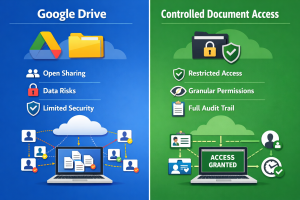
The Core Difference (Storage vs Control)
The fundamental difference between Google Drive and controlled document access is how they treat documents.
Google Drive
➡️ A cloud storage and collaboration platform
Controlled Document Access
➡️ A secure document governance system that controls how files are accessed after sharing
Google Drive is built around file storage and collaboration.
Controlled document access is built around secure distribution and post-share control.
This difference defines everything else.
What Google Drive Is Designed For
Google Drive is optimised for:
- File storage
- Internal collaboration
- Team editing
- Version control
- Folder organisation
It works extremely well inside organisations where users are trusted and collaboration is ongoing.
However, its model is still based on file ownership and access permissions.
Once a file is shared externally, control becomes limited.
Side-by-Side Comparison
Feature | Google Drive | Controlled Document Access |
Sends original file | ✔ | ✖ |
Requires download | Optional | ✖ |
Prevents forwarding | ✖ | ✔ |
Real-time tracking | Limited | ✔ |
Instant access revocation | Partial | ✔ |
Expiry controls | Basic | ✔ |
Watermarking per user | ✖ | ✔ |
Prevents file extraction | ✖ | ✔ |
Controlled viewing session | ✖ | ✔ |
File remains on server only | ✖ | ✔ |
Audit-grade activity logs | Limited | ✔ |
The Core Security Problem With Google Drive
Google Drive relies on a permission-based model.
Once a user has access:
- They can often download the file
- They can forward access links
- They can copy content locally
- Screenshots are unrestricted
- External sharing can occur beyond intended control
Even if permissions are adjusted later, downloaded copies remain outside the system.
This creates a permanent loss of control after initial access.
The Download Problem
Downloads are the weakest point in Google Drive’s security model.
Once a file is downloaded:
- It exists outside Google’s control
- It can be copied infinitely
- It can be stored on personal devices
- It cannot be reliably revoked
- It becomes invisible to tracking systems
This is not a flaw in Google Drive—it is a limitation of file-based systems in general.
Controlled document access removes this issue entirely by eliminating the downloadable file from the workflow.
What Controlled Document Access Does Differently
Controlled document access replaces file distribution with controlled viewing sessions.
Instead of sending files, it:
- Stores documents securely on a central system
- Generates secure access links
- Streams documents in a browser viewer
- Prevents default file downloads
- Tracks all activity in real time
- Allows instant revocation of access
This ensures the document never exists as an uncontrolled copy.
👉 Related reading: View-Only Document Sharing
👉 Related reading: Secure Document Sharing
Tracking and Visibility Differences
Google Drive
- Basic “viewed” indicators
- Limited activity logs
- No detailed engagement tracking
- No behavioural insight into usage
Controlled Document Access
- Tracks every document open
- Records time spent viewing
- Shows repeat engagement
- Provides full audit trail of activity
This turns document sharing into a measurable process rather than a blind action.
Revocation and Control After Sharing
Google Drive
- Access can be removed
- But downloaded files remain accessible
- Shared links can persist externally
- Control is not guaranteed after distribution
Controlled Document Access
- Access can be revoked instantly
- Viewing sessions terminate immediately
- No persistent file exists outside system
- Full control remains active throughout lifecycle
This is a critical difference for compliance-heavy industries.
Security Model Comparison
Google Drive Model
- File stored in cloud
- Access granted via permissions
- Download optional or available
- Trust-based sharing after access
Controlled Document Access Model
- File stored centrally
- Access delivered via controlled session
- No file exposure by default
- System-enforced governance
This moves security from permission-based control to system-enforced control.
Industry Use Cases
HR Teams
Google Drive risk:
- Employee records downloaded and forwarded
Controlled access:
- Secure onboarding, payroll, and HR document control
👉 Related reading: Secure File Sharing for HR Teams
Lawyers
Google Drive risk:
- Privileged legal documents exposed externally
Controlled access:
- Controlled client viewing with revocation capability
👉 Related reading: Secure File Sharing for Lawyers
Accountants
Google Drive risk:
- Financial statements circulated without oversight
Controlled access:
- Secure client reporting with audit visibility
👉 Related reading: Secure File Sharing for Accountants
Financial Advisors
Google Drive risk:
- Investment documents shared beyond intended recipients
Controlled access:
- Controlled investor document access with tracking
Why Businesses Are Moving Beyond Google Drive for External Sharing
Google Drive remains extremely effective for internal collaboration.
However, organisations are moving away from it for external document sharing due to:
- Lack of post-share control
- Limited visibility after access
- Download-based exposure risk
- Compliance challenges at scale
- Difficulty enforcing governance externally
As document sensitivity increases, organisations require systems that maintain control after sharing—not just during storage.
H2: When Google Drive Is Still the Right Tool
Google Drive is still ideal for:
- Internal team collaboration
- Shared working documents
- Drafts and editable files
- Non-sensitive file storage
It is not designed for:
- Controlled external document sharing
- Compliance-heavy document distribution
- Client confidentiality workflows
- Regulated industry communications
This is where controlled document access becomes essential.
The Future of Document Sharing
The future is moving toward:
- No-download document systems
- Browser-based secure viewing
- Continuous access governance
- Real-time audit tracking
- Zero-trust architecture
In this model:
- Files are no longer distributed assets
- Access is the controlled resource
- Governance is continuous, not static
Controlled document access is aligned with this direction.
H2: Final Verdict
Google Drive is an excellent collaboration and storage tool.
But it is not designed to maintain control over documents after they are shared externally.
Controlled document access provides:
- Continuous visibility
- Post-share control
- Compliance alignment
- Secure browser-based viewing
For organisations handling sensitive information, this is not an upgrade—it is a different model entirely.
Start Free Trial (No Credit Card Required)
Stop relying on file-based sharing systems for sensitive documents.
Start using controlled document access today.
📌 INTERNAL LINKING BLOCK
Continue exploring:
- 👉 Password Protected Document Sharing
- 👉 Secure Client Document Portal
- 👉 Secure File Sharing for Lawyers
- 👉 How to Recall a Sent File
- 👉 Track Who Opened a File